60 mins


 China
China  India
India  Japan
Japan  Philippines
  Singapore
  South Africa
  Sri Lanka
  Thailand
  Colombia
  Ecuador
  Austria
  Denmark
  Finland
  France
  Germany
  Hungary
  Norway
  Poland
  Portugal
  Romania
  Spain
Spain  Sweden
  Switzerland
  United Kingdom
  UAE
UAE  Canada
  Mexico
  United States

.svg)




The first reaction
When Code Apps was first introduced for Public preview, the initial reaction was less excitement and more confusion.
If flexibility is required to build enterprise scale application, Azure already exists. If speed is the priority, Power Apps already delivers it. So, what exactly is Code Apps trying to solve?
The answer becomes clearer when you look at how most business applications are actually built.
Very few applications are truly simple. And very few are truly complex. Most sit somewhere in between - too complex for low-code tools alone, yet too lightweight to justify the overhead of a full-scale Azure development project.
This is the gap Code Apps is designed to address.
The gap we see today…
Development typically begins with a Canvas App because of its speed. Forms, workflows, and data integrations come together quickly. However, as the application evolves, limitations begin to surface. Not across the entire application, but in specific areas.
A screen may require richer interaction. A UI may need to behave more like a product than a form. Performance issues may emerge as usage increases.
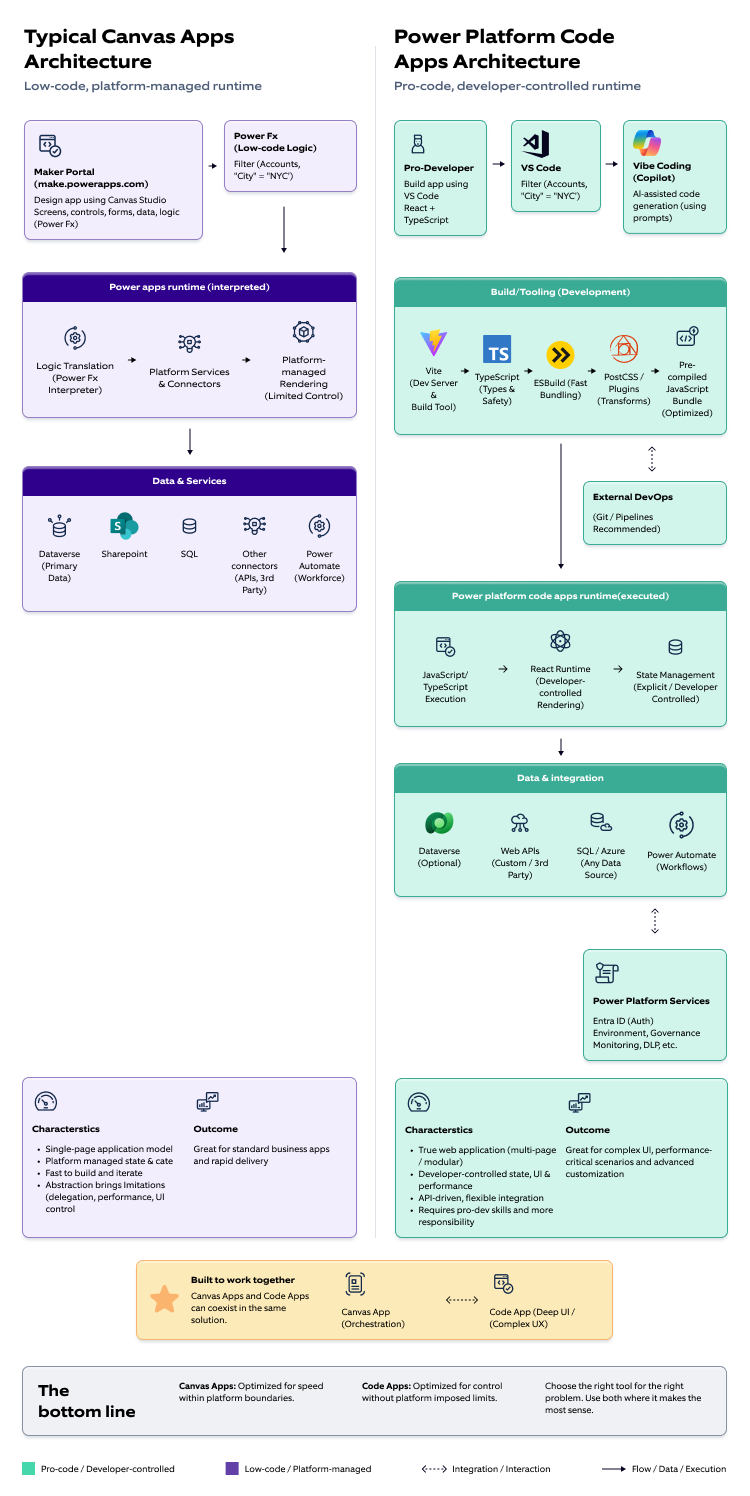
A key reason lies in how Canvas Apps operate - They follow a single-page application model, where a significant amount of data and state is loaded and managed upfront. This works well for standard business scenarios, but begins to show constraints as complexity grows.
How Canvas Apps actually work
Canvas Apps operate within a single-page application architecture, i.e. the application loads as a single unit. Screens exist within the same runtime, and data is managed centrally using Power Fx. This abstraction enables rapid development, but at the same time, it introduces limitations such as heavy initial load, delegation constraints, and limited control over rendering and state management.
A shift in application model
Code Apps introduce a fundamental shift in how applications are structured within Power Platform.
Instead of operating within a single-page, platform-managed model, applications follow a more modular and web-oriented approach. Different parts of the application can load and execute independently, allowing more granular control over user interactions and data flow.
This shift reduces reliance on platform abstractions and enables developers to design application behavior more intentionally. Rather than working around predefined patterns, the application structure, data flow, and interaction model can be shaped based on specific requirements.
In essence, the model moves from platform-driven execution to developer-defined behavior, which becomes critical in scenarios involving complex UI patterns or performance-sensitive operations.
How Code Apps work
A Code App behaves like a modern web application built using standard frontend technologies such as React and TypeScript.
At runtime, the application interacts with data sources through APIs, including Dataverse, SQL, and external services. Tooling such as PAC CLI can provide local schema and typing support, but data access remains API-driven.
Power Platform continues to play an important supporting role. It provides identity through Entra ID, environment management, governance controls, and access to a wide range of pre-built connectors that simplify integration with Microsoft and third-party services.
The key difference is that while the platform provides the foundation, the application layer is fully controlled by the developer. Responsibilities such as state management, rendering behavior, and interaction handling are explicitly implemented, enabling greater flexibility but also requiring stronger engineering discipline.
Vibe vs. Vibe Coding vs. Code Apps — Clearing the confusion
A common question arises at this stage. If vibe.powerapps.com can generate applications, and Code Apps can also be generated using prompts, what is the difference?
This confusion typically stems from mixing up product, capability, and outcome.
Vibe (vibe.powerplatform.com) is the product experience. It generates low-code applications within Canvas-style boundaries, where behavior remains governed by the platform.
Vibe coding is simply an AI-assisted way to generate code. It can speed up how a Code App is created, but it is not mandatory, developers can also build the same app from scratch.
Code Apps is the outcome. It represents a pro-code application built using React and TypeScript, where full control over behavior is available.
Code Apps are not defined by how they are generated. They may be created using Vibe coding or developed manually from scratch. In both cases, they remain pro-code applications.
In simple terms:
-
Vibe provides a configurable application within platform constraints.
-
Code Apps provides a programmable application without those constraints.
-
Vibe accelerates the starting point. Code Apps extends what is possible.
Where Code Apps actually adds value
This distinction becomes clearer in real-world scenarios. Applications often begin as Canvas apps and function effectively in the initial stages. Over time, requirements evolve. Greater control over UI is required, Performance needs increase, Certain behaviors become difficult to implement using Power Fx and at this point, platform limitations become evident. Until now, the typical response to these limitations was either to rebuild the application on Azure or to patch individual gaps with PCF controls. While PCF is effective for extending isolated components, it was never designed to solve application-wide customization challenges. As customization needs grow across the entire user experience, this approach becomes increasingly difficult to maintain, often pushing teams toward a full redevelopment effort.
Code Apps addresses this limitation. Instead of embedding custom components within a constrained UI, the entire experience can be built using modern frameworks. In many cases, this reduces or eliminates the need for PCF or moving the application to Azure.
The trade-off nobody should ignore
Code Apps bring a noticeable shift in how applications are built and managed. While they provide greater flexibility and control, they also move away from the simplicity of low-code. This means teams gain more capability, but also take on more responsibility in how the application is designed and maintained.
Full control over behavior
The platform no longer manages how the app behaves. Teams can design interactions and flows exactly as needed, but this also means they must handle more decisions themselves.
Greater responsibility for performance
How fast the app loads, how smoothly it runs, and how it handles data is no longer optimized automatically. Teams need to actively design for performance.
More effort in handling issues
Error handling, edge cases, and unexpected scenarios must be thought through and managed within the application, rather than relying on built-in safeguards.
Less abstraction, more ownership
The simplicity of low-code is replaced with a more hands-on approach. This gives flexibility but also requires stronger discipline in design and development.
Azure vs. Code Apps — The real decision
However, most enterprise applications do not begin that way. They evolve gradually, starting with standard business workflows and expanding over time. Rebuilding an entire solution due to localized complexity can introduce significant overhead—both in cost and in time.
This is where Code Apps provides a distinct advantage.
Instead of forcing a full replatforming, Code Apps allows organizations to extend existing Power Platform solutions with pro-code capabilities. Teams can retain:
Existing investments in Dataverse and business logic
There is no need to recreate data models, relationships, or workflows outside the platform.
Built-in governance, security, and environment management
Identity, access control, and compliance structures remain consistent across the solution.
Seamless integration through connectors and platform services
Existing integrations do not need to be re-engineered from scratch.
A unified solution landscape
Low-code and pro-code components can coexist within the same ecosystem, reducing fragmentation.
In this context, Code Apps is not positioned as a replacement for Azure, but as a complementary approach. It is most effective when the goal is not to rebuild, but to enhance and extend, bringing in pro-code flexibility only where it is genuinely required, while continuing to leverage the strengths of the Power Platform.
Current limitations and reality check
Code Apps is powerful, but it is not fully mature yet. Some practical limitations today:
-
No native mobile runtime support (web-first experience)
-
No unified ALM (code lifecycle and solution lifecycle are separate)
-
Requires full pro-dev skillset (React/TypeScript)
-
UI consistency must be built and enforced manually
-
Higher testing and performance responsibility etc.
Microsoft is actively investing in:
-
Better Copilot integration
-
Improved developer tooling
-
Stronger alignment with Power Platform ALM
What changes with Code Apps
The introduction of Code Apps is not just a technical enhancement, it fundamentally changes how applications are built, owned, and operated within an organization.
The development model shifts from a predominantly low-code approach to a hybrid model, where both low-code and pro-code capabilities coexist. This requires clearer structure and discipline in how solutions are designed and maintained.
Shift in skill requirements
Teams now need strong frontend engineering capabilities alongside Power Platform expertise. Building and maintaining Code Apps requires knowledge of modern web development practices, not just platform configuration.
Clear separation of responsibilities
A defined boundary between low-code and pro-code layers becomes essential. Canvas Apps, flows, and Dataverse handle standard business processes, while Code Apps take ownership of complex UI and advanced logic. Without this clarity, solutions can quickly become difficult to manage.
More structured development lifecycle
Development moves closer to traditional software practices. Version control, build processes, testing strategies, and release coordination become more important than in purely low-code scenarios.
Increased focus on quality and performance
Since application behavior is no longer abstracted by the platform, teams must actively design for performance, handle edge cases, and ensure consistent user experience.
Evolving team collaboration model
Citizen developers and professional developers now need to work more closely. Solutions are no longer owned by a single type of role but require coordinated ownership across different skill sets.
Final take
Code Apps is not intended to replace Canvas Apps or Azure-based development. It introduces a new layer within the Power Platform ecosystem, one that bridges low-code simplicity with pro-code flexibility.
The key is not to treat Code Apps as a default approach, but as a targeted capability. When applied in the right scenarios, it enables organizations to extend existing solutions without the cost and disruption of full replatforming. It allows teams to address complexity precisely where it exists, while continuing to leverage the strengths of the platform.
However, this flexibility comes with a shift in mindset. The focus moves from rapid configuration to deliberate engineering. Decisions around architecture, performance, and maintainability become more explicit and require stronger discipline.
Used thoughtfully, Code Apps enhances the platform and expands what can be achieved within it. Used indiscriminately, it can introduce unnecessary complexity and blur architectural boundaries.
Ultimately, Code Apps is not about choosing between low-code and pro-code. It is about bringing them together in a controlled and intentional way—using each where it delivers the most value.